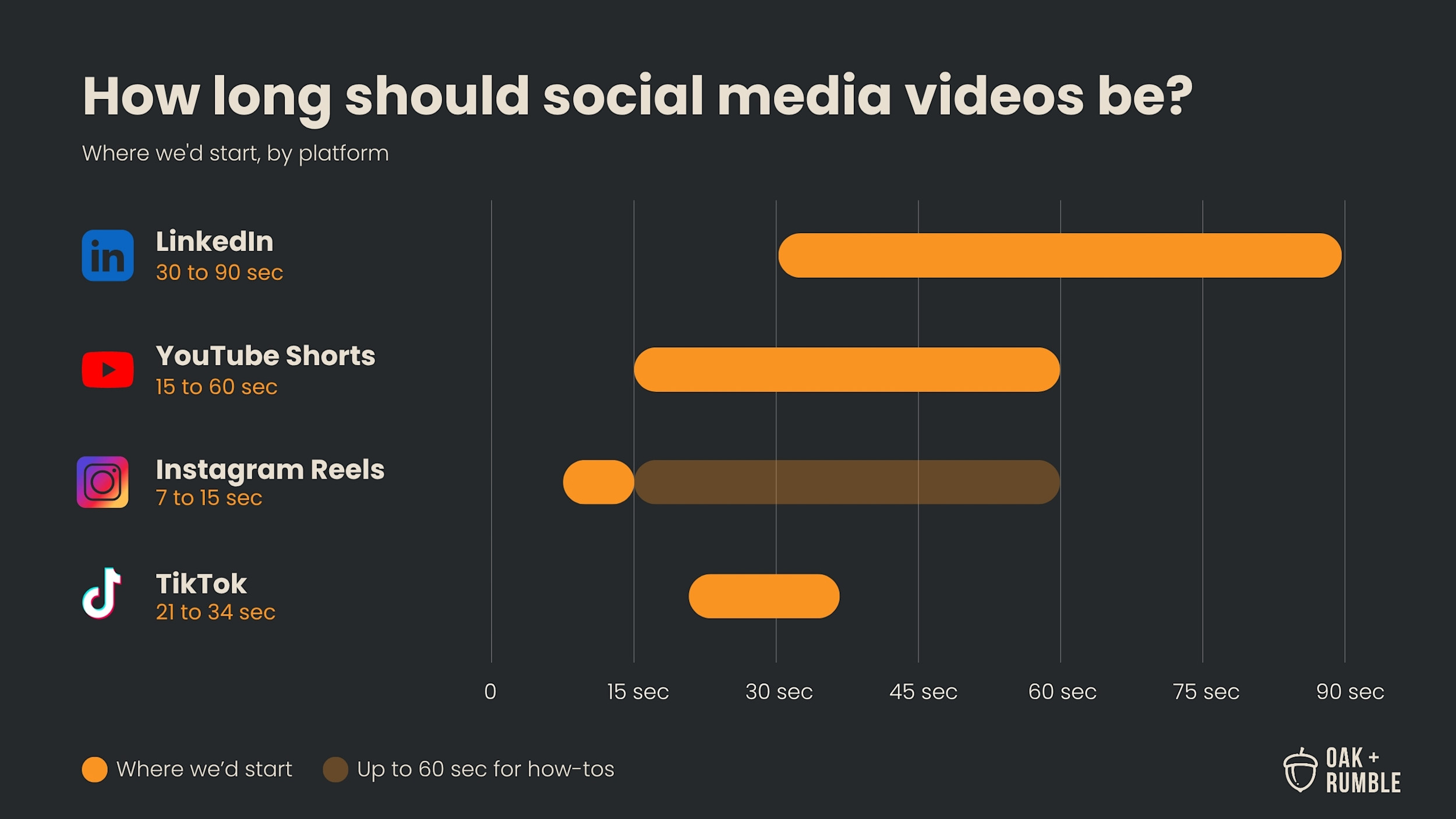

Most B2B social videos should run between 7 and 90 seconds, depending on the platform. As of October 2026, LinkedIn gives you the most room, with 30 to 90 seconds working well for most posts. YouTube Shorts and Instagram Reels both allow up to 3 minutes, and TikTok recommends 21 to 34 seconds for most ads. Treat every platform's maximum as a ceiling. The right length is the shortest one that gets your point across, and on every platform, that point needs to show up in the first few seconds. This guide is written for B2B marketing teams, especially if your videos go through legal or compliance before they go anywhere.
[NO VIDEO: remove the 2024 Vimeo embed (ID 1009888025). Its platform limits and TikTok figure are out of date and would contradict the post.]
Social media video length at a glance
Here's where each platform's limits sit as of October 2026, and the length we'd start with for B2B content.
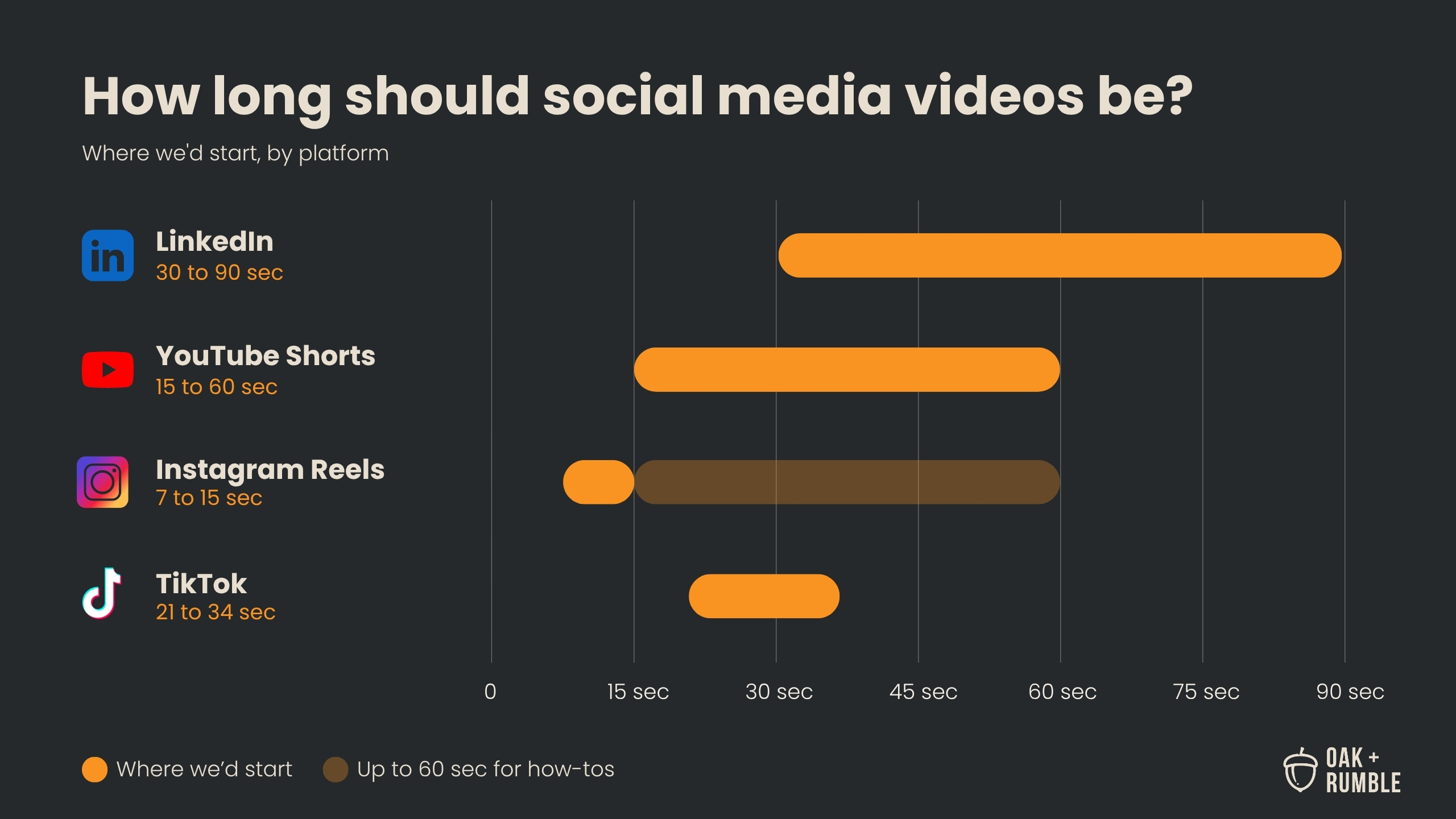
Platform | Maximum length | Where we'd start | Good to know |
|---|---|---|---|
15 minutes | 30 to 90 seconds | Upload natively and plan for sound-off viewing | |
YouTube (long-form) | 15 minutes, or 12 hours once your account is verified | As long as the answer needs | Post here for reach; host your website videos elsewhere |
YouTube Shorts | 3 minutes | 15 to 60 seconds | Only the first 60 seconds of a Shorts ad plays in the feed |
Instagram Reels | 3 minutes (the camera can record up to 20) | 7 to 15 seconds; up to about a minute for how-tos | Instagram mainly recommends Reels of 3 minutes or less |
TikTok | 3 minutes for everyone; 5 or 10 minutes for some accounts | 21 to 34 seconds | TikTok's own recommendation for most ads |
Which platforms to focus on
Focus on the one or two platforms your buyers actually use, and for most B2B companies, that starts with LinkedIn. It's where most of the people you sell to already are. There may be the odd exception, but if you sell to other businesses, LinkedIn is the safest place to start.
It's also better to do two platforms well than to spread a small team across four. Posting everywhere sounds efficient until every channel gets a rushed cut and a half-written caption. Bigger companies with dedicated social teams can stretch further, but the same rule applies: add a platform when you can keep it up. For how social video fits into the bigger plan, see our B2B video strategy playbook for finance and insurance teams.
LinkedIn video length
LinkedIn is where B2B video can run longest, and 30 to 90 seconds is the range we'd start with for organic posts. That's long enough to make a real point, and short enough that people finish it between meetings. Organic LinkedIn videos can run up to 15 minutes, so the limit is rarely the problem. LinkedIn has also shown vertical video in a full-screen feed on mobile and desktop since early 2025, so 9:16 works well here too.
We're on LinkedIn every day, and one pattern is hard to miss: company pages tend to get much less engagement than the people who work there. People want to connect with people. The businesses doing best on LinkedIn put their leaders and experts front and centre, posting about the business from their own profiles, so your people are the best thing to put in your LinkedIn videos. If your experts get stiff on camera, start with our tips on how to look natural on camera.
The formats we'd start with on LinkedIn:
Short clips of an executive or subject-matter expert answering one question your buyers ask, posted from their own profile
Cut-downs from a longer brand film, case study, or event video
A recurring series with the same format each time, so people start to recognize it
Don't post and ghost. LinkedIn is a networking community, so it rewards the people who show up between posts too. Reply to the comments on your own videos, leave real comments on other people's, and like the things your buyers share.
Let some personality in. LinkedIn is wall-to-wall polished B2B content that goes in one ear and out the other. What social media managers lovingly call "shitposting" (a behind-the-scenes moment, a joke about your own industry, an honest opinion nobody asked for) works because it stops the scroll and makes you a lot more relatable. We're all people, and people like being entertained. Just know where the line is when you're posting for a company that isn't yours, especially if your posts go through legal or compliance before they go out.
Plan for people watching with the sound off. Plenty of people scroll LinkedIn at work, and LinkedIn's video ad guidance says to design for sound-off viewing and get your key message into the first 10 seconds. That's good advice for organic posts too, and burned-in captions take care of most of it.
Upload your videos to LinkedIn directly. We've found LinkedIn holds back posts that send people off the platform, so we upload every video natively and keep any links out of the post.
YouTube video length
Treat YouTube as a social platform with a search engine built in: post your long-form videos there for reach, and use 15 to 60 second Shorts to send people to them. We tell clients to think of YouTube as more than a place to park videos. It's a social platform that leans toward search, and it's where people go when they want to watch something longer.
Long-form YouTube videos
Long-form YouTube videos can be as long as the answer needs. By default you can upload videos up to 15 minutes long, and up to 12 hours once your account is verified. On our own channel, longer videos that answer real buyer questions, like what video actually costs, do better than short thought-leadership clips.
Keep YouTube separate from your website, though. For the videos on your site, use a business video platform like Vidyard, Wistia, or Vimeo. YouTube's player adds its own branding and suggests other videos when yours ends, which pulls people off your page. A business player keeps them on your page and gives you much better viewing data. Vidyard and Wistia can even tie views to the specific people who watched. Then post the same videos to YouTube on their own for reach. Our video distribution guide compares the three hosting platforms.
How long YouTube Shorts can be
YouTube Shorts can be up to 3 minutes long, and 15 to 60 seconds is a good starting point for most B2B Shorts. YouTube raised the limit from 60 seconds to 3 minutes in October 2024. It doesn't publish an ideal length for regular Shorts, so treat any "YouTube recommends X seconds" claim you see with suspicion. For Shorts ads, Google is more specific: ads can run up to 3 minutes, but only the first 60 seconds plays in the Shorts feed.
The best job for a Short is sending people to your long-form videos. A good Short opens a curiosity gap: it gives viewers one interesting piece of the answer, and the full video is one tap away. YouTube has let you link a Short to one of your longer videos since 2023, so use that link every time. The same clips you post on LinkedIn work well here too.
Instagram Reels length
For most B2B brands, 7 to 15 seconds is the sweet spot for an Instagram Reel, stretching to about a minute when you're teaching something. Instagram raised the standard Reel length from 90 seconds to 3 minutes in January 2025, and in late 2025 its camera started recording up to 20 minutes. It still mainly recommends Reels of 3 minutes or less to people who don't follow you, so longer Reels mostly reach the followers you already have.
Short Reels also tend to loop, which can rack up views and leaves people wanting more. That's a better problem to have than someone bailing at second 40 of a 90-second explainer.
Where Instagram fits for B2B
Instagram usually isn't where B2B buyers decide who to hire, but it can still earn a spot in two places: showing what it's like to work with (and for) your company, and paid ads. Organic Instagram is a good home for employer brand and recruitment content, like behind-the-scenes moments, team spotlights, and the human side of the business. It matters more if part of your company sells to consumers too, like a bank's retail side or a personal insurance line. An Instagram campaign we made for the Accelerator Centre passed 10,450 views.
If you're only posting there because it feels like you should, go back to the two-platform rule above. Instagram is a fine second channel and a tough first one for most B2B teams.
Meta ads for B2B teams
Meta ads are where a lot of B2B teams get the most out of Instagram, and one ad can run on Instagram and Facebook at the same time. The catch is targeting. Meta can't target by job title the way LinkedIn can, so lean on your own data instead:
Upload a customer or prospect list and show your videos to those people
Retarget people who've visited your website or watched your other videos
Build lookalike audiences from your best customers, if no special ad category applies (more on that below)
Use Lead Ads, so people can fill in a form without leaving Instagram or Facebook
Meta also leans hard on automation now. Its Advantage+ audiences treat most of your targeting as suggestions it can expand beyond, so give it good source lists and keep an eye on who it's actually reaching.
If you advertise financial products or services, check Meta's special ad categories before you plan anything. Since January 2025, US campaigns for banking, insurance, investing, and other financial products have to use the Financial Products and Services category, and Canadian teams should plan for the same rules. Recruitment ads in Canada and the US fall under the Employment category. Both lock age targeting to 18 and up, remove gender and postal-code targeting, set a minimum location radius, and rule out lookalikes, so your own lists and retargeting do the heavy lifting.
TikTok video length
TikTok recommends 21 to 34 seconds for most ads, with the main message in the first 3 seconds and the hook landing within the first 6, according to TikTok's own creative guidance. If you've seen "21 to 24 seconds" quoted around the internet (we may have said it ourselves), 21 to 34 is the actual figure.
As of October 2026, every TikTok account can post videos up to 3 minutes long, and some accounts can post 5 or 10 minutes. Long TikToks exist, but short ones are still what the format is built around.
Where TikTok fits for B2B
TikTok works for B2B when you have a clear reason to be there and the time to show up like a person. Good reasons include recruiting early-career talent, building your employer brand, and teaching something your audience actually wants to learn. The content that works there is the human, low-polish kind from the LinkedIn section, only more so. For most teams selling to finance, insurance, or engineering buyers, TikTok is something to test once LinkedIn and YouTube are running.
TikTok's ad targeting has no job title, employer, or industry options. You target by interests and behaviours, or by your own customer lists and the lookalikes built from them. Spark Ads let you put money behind a post that's already doing well, either yours or a creator's with their permission, and the views and comments stay on the original post.
If you're in financial services, TikTok ads are allowed in Canada and the US with conditions: you need to be licensed, include the required disclosures, and show the ads only to people 18 and over. Recruitment ads in both countries need TikTok's special ad category turned on, which blocks targeting by age and gender. And if you were wondering, TikTok is still available in Canada after the federal government allowed it to keep operating here under new conditions in March 2026.
Whichever platform you pick, plan who's watching the comments. Both Meta and TikTok let you automatically hide comments that contain words you choose, and TikTok lets you turn comments off on an ad entirely. That helps when every public reply has to stay on the right side of compliance.
Hooking viewers in the first few seconds
On every platform, the first few seconds decide whether anyone sees the rest. TikTok wants your main message in the first 3 seconds and LinkedIn says the first 10, so open on the point and save the context for later.
You've probably heard that people now have a shorter attention span than a goldfish. That stat came from a 2015 marketing report, and researchers haven't been able to back it up. People will happily watch a long video about something they care about. They just decide fast whether this is that video.
What works for a hook:
Open with the question, the result, or the most surprising line, and save the logo for the end
Put text on screen from the first frame, so it works with the sound off
Burn captions into the video, which helps sound-off viewers and makes the video more accessible
Cut the wind-up ("Hi, I'm Jordan, and today we're going to talk about…") and start mid-thought
Post natively, and keep it original
Give each platform its own clean, original upload. Since April 2024, Instagram has stopped recommending videos with visible watermarks from other apps, and accounts that mostly repost other people's content get dropped from recommendations. In 2026, Instagram extended those rules to photos and carousels, and Meta applied them to Facebook too.
So the TikTok you saved with its watermark and dropped into Reels is working against you. Export a clean master for each platform from your edit, and you can still post the same video everywhere without paying for it in reach.
Specs that work on every platform
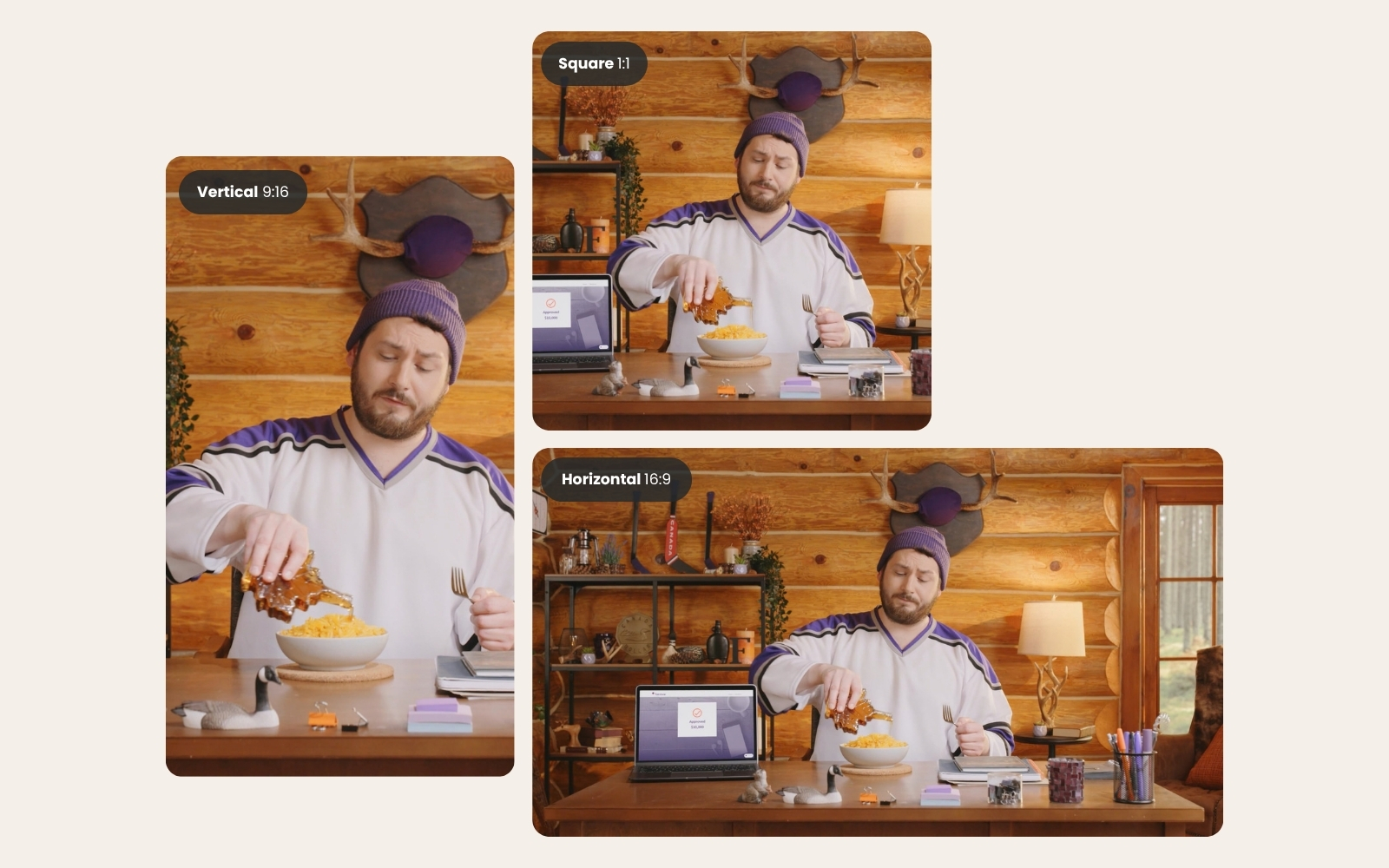
Vertical 9:16 video at 1080 x 1920 with burned-in captions works on all four platforms. For every short video we make for our own channels, we export:
A 9:16 version with burned-in captions, the main version for social
A 16:9 version without captions, for YouTube, your website, and anywhere a horizontal video fits better
Thumbnails for both
An .SRT caption file, so platforms that support uploaded captions can use them
You'll still see square 1:1 video in some feeds, but it's rarely used these days. Vertical fills more of the screen on every app, so we've mostly stopped making square versions.
Keep text and faces in the centre of the frame. Each app puts buttons, captions, and profile info around the edges, especially along the bottom and right side, and that's where your key line will get covered.
Planning social cut-downs into one shoot
The easiest way to get social videos at the right length is to plan them before the shoot, so the cut-downs come from footage you're already capturing. A single production day can feed about 90 days of content when the clips are planned from the start. Every long-form video we make for our own channel turns into three social clips, each posted to LinkedIn, Instagram, and YouTube Shorts.
A few things make this work, especially if your videos go through legal or compliance:
Write the clips into the script. If you know you want a 20-second clip, write a line that can stand on its own as a 20-second clip.
Send the cut-downs for review with the main edit. Then a 15-second clip doesn't need its own approval round two weeks later.
Plan French versions early. If you need English and French, build both sets of captions and on-screen text into the schedule from the start.
Series content does especially well on LinkedIn. The founder spotlight series we made for the Accelerator Centre averaged about 5% engagement, nearly double their other LinkedIn content from that period. For more on getting a shoot to go further, see what happens to the footage that doesn't make the final cut.
Frequently asked questions
How many hashtags should you use on Instagram?
Most B2B brands should use three to five specific hashtags on Instagram, and skipping them entirely is fine too. Instagram's head, Adam Mosseri, has said hashtags help Instagram understand what a post is about but aren't a way to get more reach. Pick a few that describe the topic or your industry, and spend the rest of your effort on the hook and the caption. Since December 2025, Instagram caps captions at five hashtags anyway.
How long should a LinkedIn video ad be?
LinkedIn video ads can run from 3 seconds to 30 minutes. LinkedIn recommends getting the key message into the first 10 seconds, and testing a short version (5 to 15 seconds), a version of about 30 seconds, and a longer one to see what your audience responds to.
How long should a website video be?
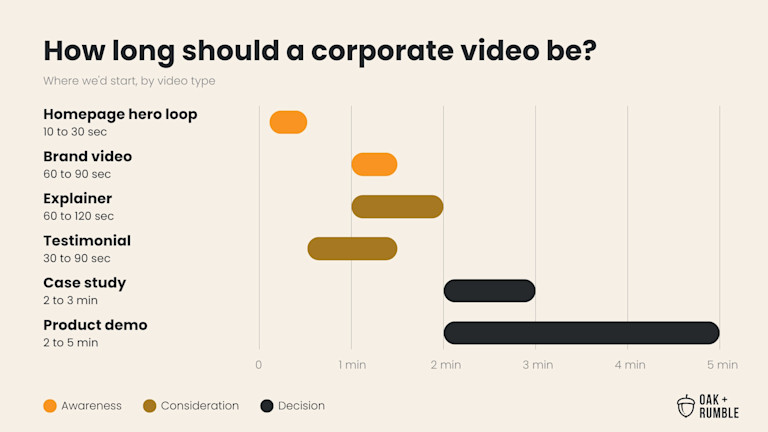
Most corporate and marketing videos on your website should run under two minutes, and they can run longer the closer a viewer is to a decision, like a case study or product demo. We break it down by video type in our guide to how long a corporate video should be.
Not sure whether your social video is pulling its weight next to everything else your team makes? Find out where you stand in a few minutes.