
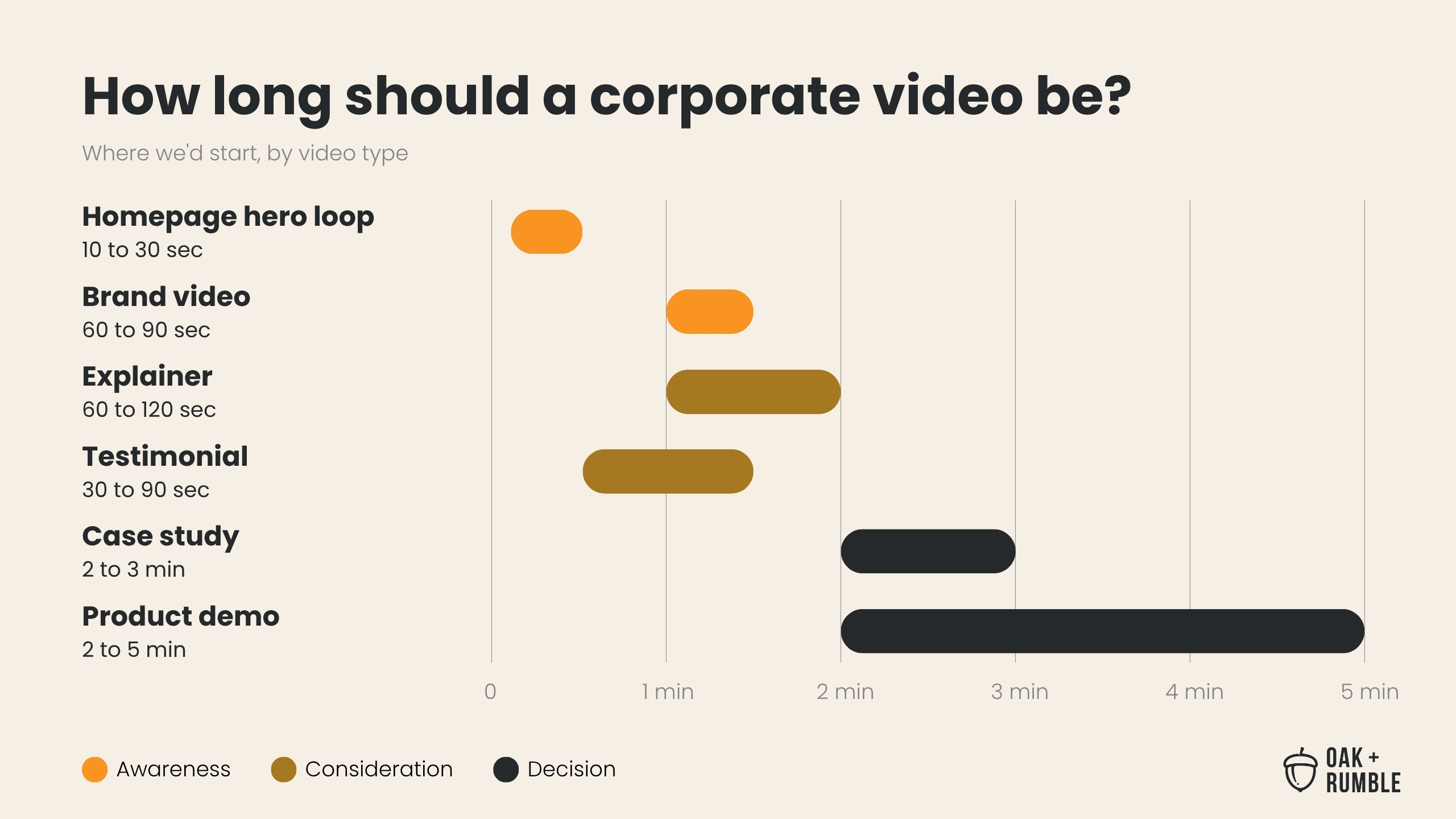
Most corporate and marketing videos on your website should run under two minutes. The exact length depends on the video's job and where it sits on your site: the closer a viewer is to a decision, the longer the video can be. A homepage brand video works best at 60 to 90 seconds, an explainer at 60 to 120 seconds, and a customer testimonial at 30 to 90 seconds. Case studies can run 2 to 3 minutes and product demos up to 5, because the people who click on them already want the detail. Make each video as long as its one main point needs, and no longer. This guide covers the videos that live on your website. For LinkedIn, YouTube, and the rest, see our guide to social media video length.
Corporate video length at a glance
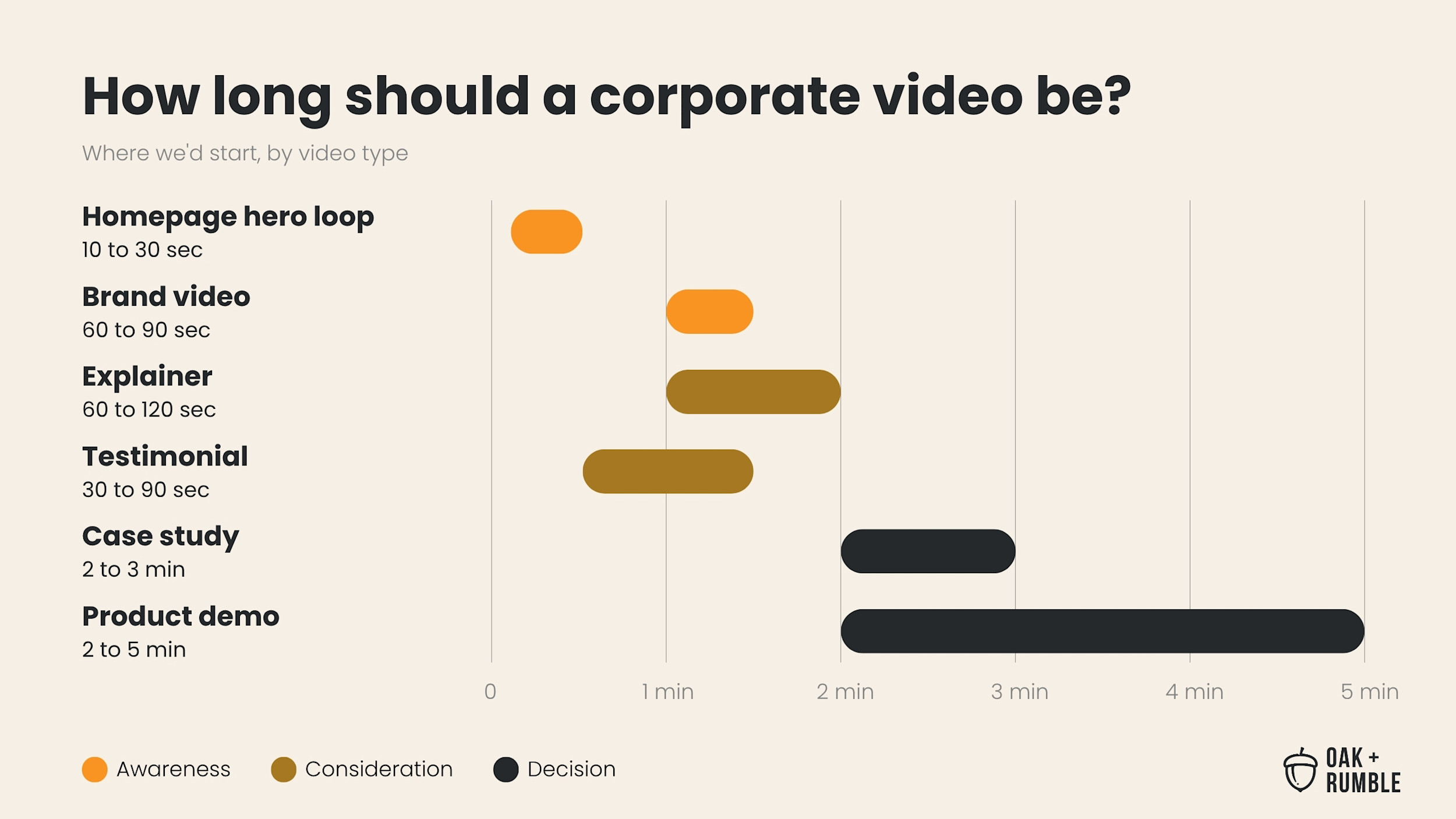
Here's where we'd start for each type of video on a B2B website. The colours in the chart and the last column of the table show the stage of the buying decision each video usually serves: awareness (people finding out who you are), consideration (people comparing their options), and decision (people getting ready to pick someone). More on why that matters further down.
Video | Where it usually lives | Where we'd start | Funnel stage |
|---|---|---|---|
Background loop | Behind your homepage headline | 10 to 30 seconds, silent and looping | Awareness |
Brand or "about us" video | Homepage, About page | 60 to 90 seconds, and under 2 minutes | Awareness |
Explainer or service overview | Service and product pages | 60 to 120 seconds | Consideration |
Customer testimonial | Service pages, near a contact form | 30 to 90 seconds | Consideration |
Case study | Case study and work pages | 2 to 3 minutes | Decision |
Product demo or walkthrough | Product pages, sales follow-up emails | 2 to 5 minutes | Decision |
Webinar or training | Resource hub, often behind a form | As long as it needs, with chapters | Decision and after |
Why the funnel decides the length
The further down the funnel a video sits, the longer it can be. Someone landing on your homepage is usually at the awareness stage and hasn't committed to anything yet. They're deciding in a few seconds whether you're worth their time, so a short video that gets to the point keeps them around.
Someone watching a product demo is usually at the decision stage, which is a very different spot. They clicked on it, they're comparing options, and they want the detail. A five-minute walkthrough is a gift to that person. The same five minutes on your homepage is an ask most visitors won't say yes to.
So before anyone asks "how long should this be," ask what the video is for and who'll be watching when they find it. That answer does most of the work.
Homepage video length
Your main homepage video should run 60 to 90 seconds, and never past two minutes. Most homepages have room for two kinds of video, and they follow different rules.
A background loop plays silently behind your headline. Keep it to 10 to 30 seconds, make sure it loops cleanly, and never put anything in it that visitors need to hear or read. Browsers generally block autoplay with sound until someone interacts with the page (see Chrome's autoplay policy), so it has to make sense on mute.
A brand video is the one people click to watch. This is where you show who you are, what you do, and why it matters, with sound and burned-in captions.
A strong brand video can end up as the most-watched video you have. For Linamar, we made "A New Look," a one-take brand and investor video. It became their most-watched video, outperforming their other uploads by 500% to 3,000%.
Explainer and service video length
An explainer or service overview should run 60 to 120 seconds. That's enough to name the problem, show how you solve it, and tell people what happens next. Explainers usually sit near the top of a service or product page, just under the headline, where visitors land when they want to know what you do and how it works.
If your explainer is creeping past two minutes, it's usually trying to cover more than one service. Give each service page its own video instead. Your visitors only came for one of them anyway, and nobody has ever complained that a service page got to the point too fast.
Testimonial and case study length
A customer testimonial should run 30 to 90 seconds, and a full case study 2 to 3 minutes. A testimonial does one job: a real client confirming one thing about working with you. A case study has more room to walk through the problem, what you did, and what changed.
Both work hardest close to a decision. Put testimonials on service pages and near your contact form, where a visitor is weighing whether to reach out, and give case studies their own pages.
Product demo and webinar length
Product demos and walkthroughs can run 2 to 5 minutes, and webinars can run as long as they need to. These viewers are the most engaged people on your site. They're comparing options or already buying, so they'll stay for the detail if it's useful.
Long doesn't mean loose, though. Break longer videos into chapters, so people can jump to the part they need, and open with what they'll learn.
Videos your sales team sends
A personalized video from your sales team should run 30 to 60 seconds, and a recorded walkthrough after a call 2 to 3 minutes. These don't live on your website, but they're often made with the same tools, like Vidyard, and the same rule applies: the more the viewer already cares, the more time they'll give you. The short, personal video gets the meeting. The longer walkthrough is for someone who's already asked for the detail.
Personalized video can work at a much bigger scale too. For Sun Life, we made a personalized video campaign that reached an 88% email open rate and a 62% click-through rate.
Too much for one video? Make a series
If a video has to cover more than one main point, split it into a series of shorter videos. Cramming everything into one video makes it feel cluttered, confuses the people watching, and buries the one thing you most needed them to take away. We've all sat through the corporate video that tries to mention every department. Nobody remembers any of them.
The easiest fix happens before anyone writes a script: agree on one primary goal and one KPI for the video, and save everything else for the next one. Our video creative brief template walks through how, and it gives you something to point to when a stakeholder asks to squeeze in one more message.
A series gives each idea its own video and its own place on your site. Equitable's "Moments Matter" is an interview-led docuseries we made for them. Act 1 passed 1M+ views and 100K+ page views.
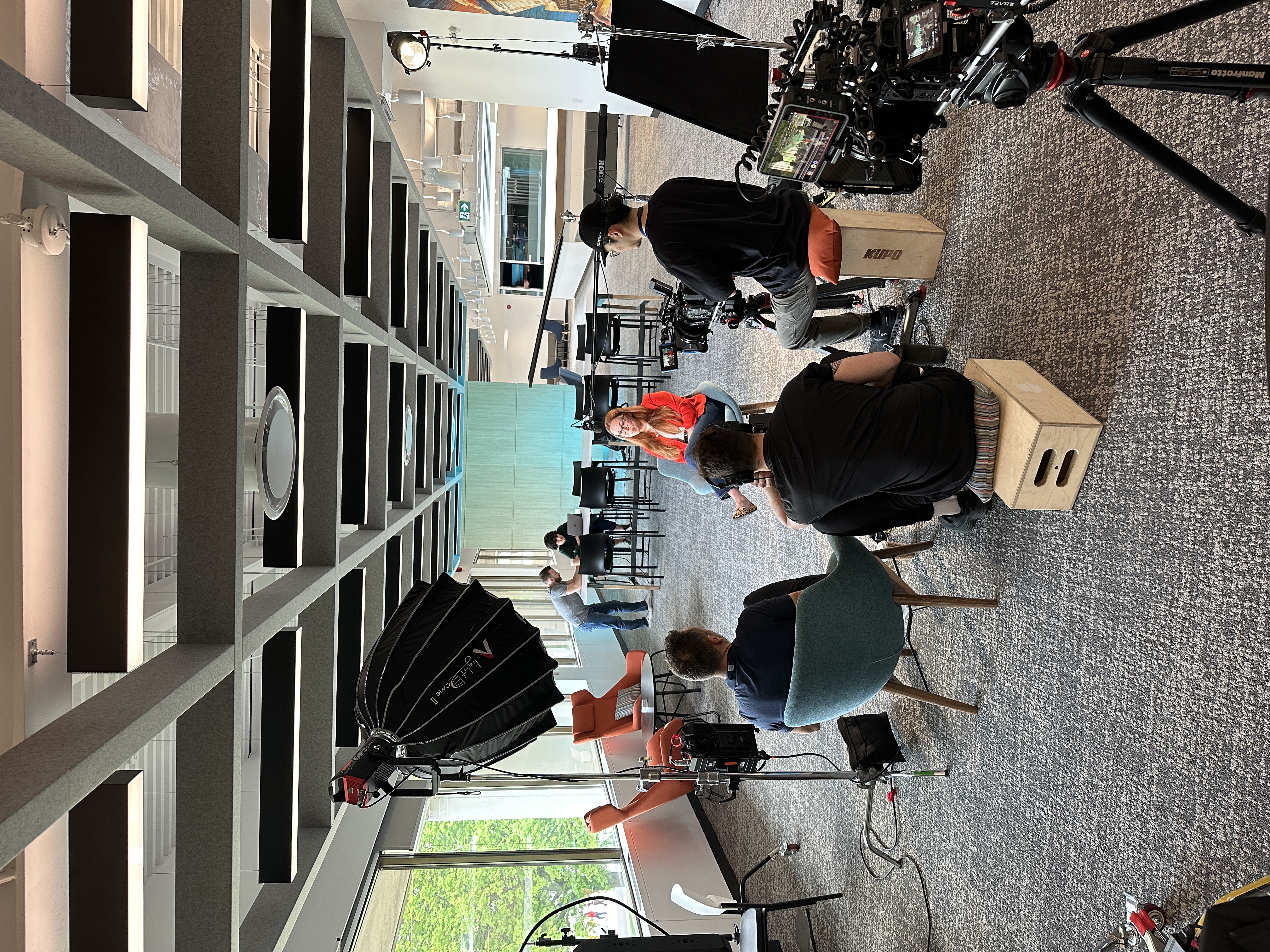
The good news is that a series doesn't have to mean more shoot days. When the cut-downs are planned before the shoot, one production day can feed about 90 days of content. Here's what happens to all that extra footage once the main video is done.
When stakeholders want it longer
When someone asks to add more, the easiest answer is usually a separate cut. Every corporate video gets to the meeting where a VP wants their team mentioned or the CEO wants to open with a welcome message. Each request is reasonable on its own. Stacked together, they turn a 90-second video into four minutes nobody finishes. (We've been in that meeting. More than once.)
A few ways to protect the length without starting a turf war:
Point back to the brief. If everyone signed off on the length and the main goal before scripting, a new request starts with a look at the brief, which is a much easier conversation than whose message matters most.
Give the extra content its own video. The CEO's welcome can be a 30-second clip on your About page, and a department spotlight can become part of a series. Plan it into the same shoot, and nobody has to book a second production day for it.
Bring the data. Your video platform shows where people stopped watching your last long video. A drop-off graph usually ends the debate faster than another round of opinions.
Cutting down videos you already have
A video that runs too long can often be re-edited into a shorter cut without a reshoot, and it's much easier when you have the original footage and project files. If your homepage still has a four-minute brand video from a few years ago, start by naming the one main point it needs to make today, then build a 60- to 90-second cut around the moments that make it.
A few things decide how easy it'll be:
Original footage and project files make it much easier. An editor can work with the voice, music, and sound on separate tracks, and pull in shots that didn't make the first version. If you're working with an agency, ask for them, or ask what happens to them after delivery.
A finished video on its own is much harder. The voiceover and music are already mixed together, so cutting a line usually cuts the music mid-phrase too, and it's very hard to make the shorter version sound right.
Interview-led videos usually cut down well, because the content already comes in self-contained soundbites.
Scripted voiceover videos are harder, since each line tends to lean on the one before it. A new line of voiceover can bridge the gaps.
Older footage may need new graphics, an updated logo, or fresh captions to match how your brand looks now.
If the original went through legal or compliance, plan for the short cut to get another look, especially if any claims or disclosures move or drop out. Keep the long version too. It can still earn its spot further down the funnel, on a case study page or in your resource hub.
Planning lengths when legal reviews everything
If your videos go through legal or compliance, decide every length before the shoot and send them for review together. A 60-second homepage cut and a 3-minute case study version can come from the same shoot, but each one is a separate thing to approve. Plan them together, and the short cut doesn't need its own approval round two weeks after everyone signed off on the long one.
A few things that help:
Write the short version into the script. If you know you want a 60-second cut, write lines that still make sense on their own at 60 seconds.
Leave room for disclosures. If your videos need on-screen disclosures, every cut needs them, including the short ones.
Plan French versions at the same time. If you need English and French, build both into the schedule from the start.
Captions, transcripts, and French versions
Every video on your website should have captions, and most should have a transcript on the page. Plenty of people watch with the sound off, captions make your videos accessible, and a transcript gives readers and search engines the full text. It's why we add a full transcript under the videos on our own blog.
For your website, upload a caption file (an SRT or VTT file) to your video player instead of burning the captions into the video. Viewers can turn them on or off, and you can add a second language later without re-exporting the video. Burned-in captions are the better fit for the short cut-downs you post on social, where a lot of people never turn the sound on.
If your company is in Ontario and has 50 or more employees, the AODA requires your public website to meet WCAG 2.0 Level AA, according to Ontario's website accessibility guidance. For prerecorded video, that means captions, plus a text alternative such as a transcript that also describes what's happening on screen. Other provinces and the US have their own rules, so check with your legal team on what applies to you.
French versions come in a few sizes:
French captions are the lightest version: the same video with a French caption file added.
French on-screen text and graphics need their own export, and any disclosures need translating and reviewing in both languages.
A French voiceover or French-speaking presenter is the full version, and it's much easier to plan into the original shoot than to add afterward.
Hosting and measuring your website videos
Host your website videos on a business video platform like Vidyard, Wistia, or Vimeo, then use its viewing data to check whether the length is right. YouTube's player adds its own branding and suggests other videos when yours ends, which pulls people off your page. A business player keeps them on your site, and our guide to distributing video content compares the three.
These platforms show you where people stop watching. If most viewers leave at the same moment, that's the part to cut or fix. If they're making it to the end, you've found your length.
One more thing for search: if you want a video to show up in Google's video results, give it a page where the video is the main thing on it. Google's video SEO guidance calls this a watch page. A video tucked halfway down a service page can still do its job for visitors. It's just less likely to be picked up as a video in search.
Frequently asked questions
Does a longer corporate video cost more?
A longer corporate video usually costs somewhat more, but running time isn't the main thing that drives the price. The type of video and how complex it is to make matter far more. A 30-second video usually doesn't cost half as much as a one-minute video, because planning, crew, and shoot costs don't shrink with the runtime. Our breakdown of what a one-minute video costs goes through it by video type.
How long should a corporate video script be?
A corporate video script runs about 130 to 150 spoken words per minute of video, so a 90-second brand video needs roughly 195 to 225 words. Interviews don't have a word-for-word script, but the same math is a useful check on how much you can say in the time you have.
How long should a social media video be?
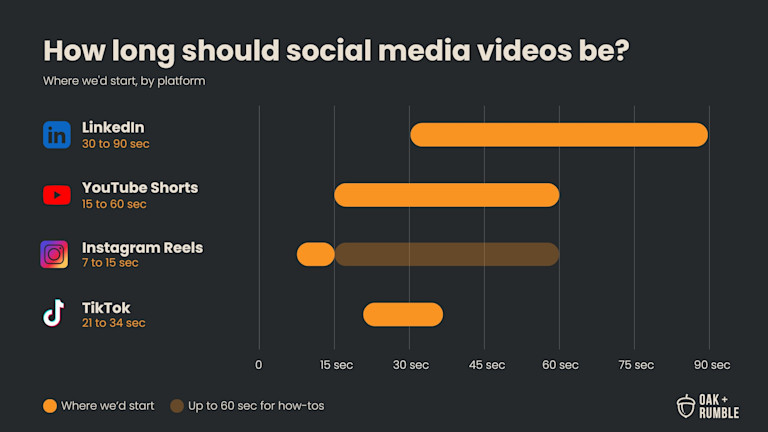
Social media videos are usually shorter than website videos, and the right length depends on the platform. LinkedIn gives you the most room for B2B content. We cover every platform in our guide to how long social media videos should be.
Not sure whether your website videos are pulling their weight? Find out where your team stands in a few minutes.
Take The 3-Minute Video Benchmark Assessment (free)
Still here? You’ve earned the full video transcript
Hey Brandon, I've been wondering about video length. How long should my website videos be?
That's a great question, Brandon. Let's get into it.
So you want to know how long your website video should be? There's one question you need to ask yourself: what's your video for? The answer to this question will determine the ideal length of your video.
Before we get started, hit that follow button for more content on video production and video marketing.
I'm going to start with a general blanket statement. Most marketing videos on a website should be under two minutes, although there are other factors that need to be considered. The typical rule of thumb for video length uses the marketing and sales funnel as a gauge. The further down the funnel your video is, the longer your video can be.
For example, the brand video that sits on the homepage of your website is further up in the funnel, so it should be under two minutes to keep your viewers engaged. Meanwhile, an instructional or tutorial video that's on your website sits further down the funnel and can therefore be longer. Why? Your audience is usually a little bit more engaged at that point, so they're prepared to watch a longer video.
Remember, 62%? Yes, 62% of people will watch your entire video if it's under 60 seconds. So the key here is finding an effective way to communicate your message in a short timeframe. Trying to cram too much into one video can feel cluttered, confuse your audience, and take away from the main goal you're trying to achieve. So stop, stop, stop trying to fit everything into one video. There's better ways to do it.
So, did that answer your question, Brandon?