
A video production checklist covers the decisions that are cheap to make before the shoot and expensive to fix after it: every platform the video will run on, the shorter cutdowns you'll want, captions, French, Spanish, or other language versions, legal sign-off, music and on-camera rights, and how your footage stays secure. Most teams plan the message and the shoot day carefully. These seven tend to surface later, usually right when the final cut is ready to go. Sort them out in pre-production, and they cost almost nothing. Find them after, and they turn into re-edits, reshoots, or a launch date that keeps slipping.
Your video production checklist at a glance
Platforms. Every place the video will run, and the shape and length each one needs
Cutdowns. The shorter versions you'll want, so the crew can shoot for them
Captions. Burned into the video, a separate file, or both
Languages. French, Spanish, or other versions, including on-screen text and graphics
Legal review. Who signs off, on what, and when
Rights. Music, stock footage, and releases from anyone on camera
Security. NDAs, and how footage and drafts get stored and shared
Every place the video will live
Before the shoot, list every place the video will run: your website, LinkedIn, YouTube, a sales deck, a trade show screen, the next town hall. Each one can need a different shape and length, and the crew frames shots differently when they know a vertical version is coming.
The three shapes that cover most B2B video:
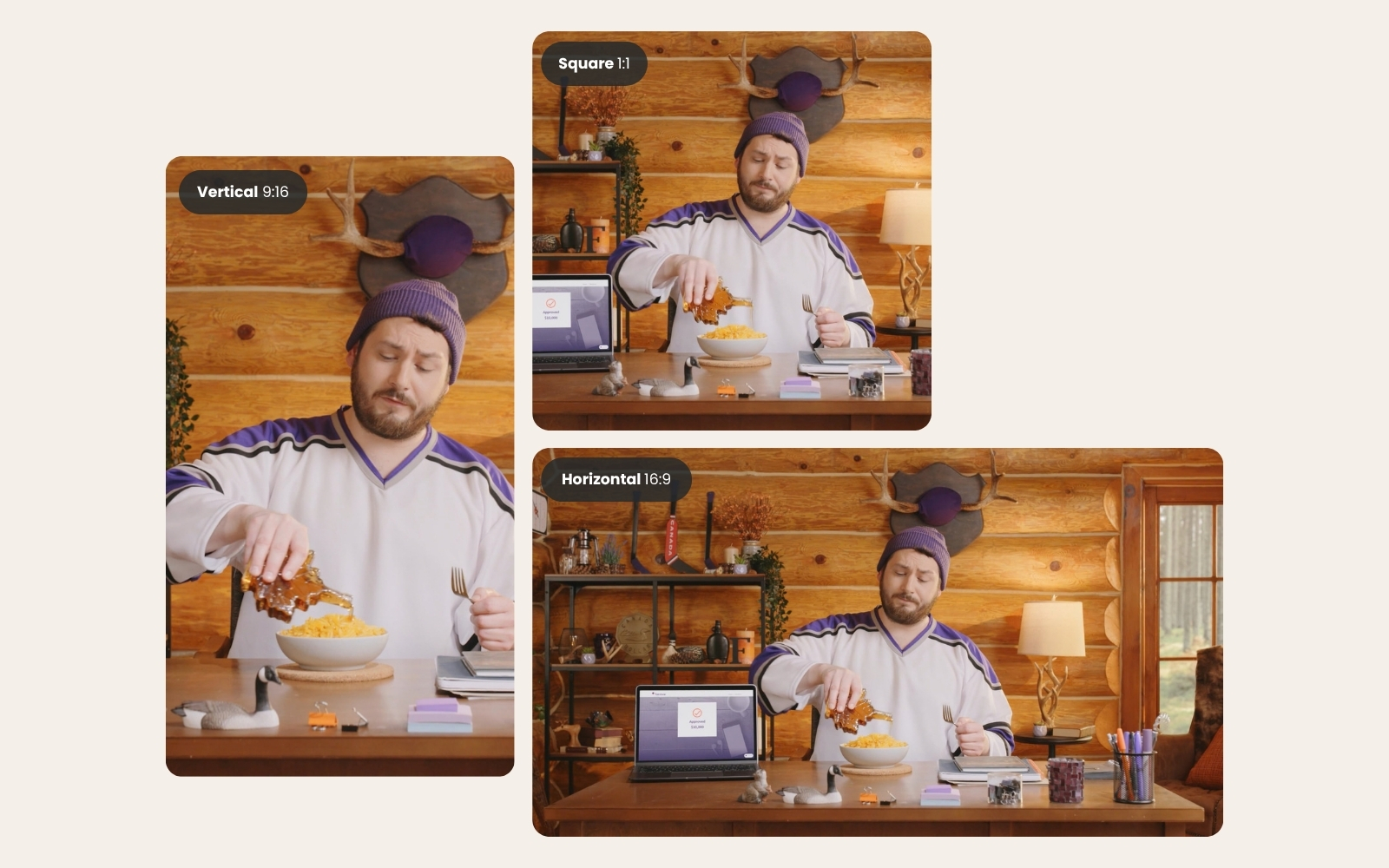
Horizontal (16:9) for your website, YouTube, presentations, and event screens
Vertical (9:16) for Reels, Shorts, TikTok, and more and more, the LinkedIn and Instagram feeds too
Square (1:1) or 4:5 for teams that still want a feed format, though vertical is quickly taking its place
A horizontal video cropped to vertical after the fact can cut the speaker's hands, the product, or half the graphics right out of frame. When we know every format up front, we frame with room for each one and design on-screen text that works in all of them. It's a small adjustment on set, and a lot cheaper than rebuilding graphics three times in the edit.
Knowing every format also decides how we shoot. If you want vertical versions from horizontal footage, shoot in 4K at minimum. A vertical video is 1080 pixels wide by 1920 tall, but HD footage is only 1080 pixels tall, so a vertical crop from HD has to be stretched to fit, and it looks softer for it. 4K footage is 2160 pixels tall, which leaves enough room to crop a sharp vertical version, and for some campaigns we'll shoot as high as 8K for even more flexibility in the edit. If you're not sure how long each version should be, here's our breakdown of how long social videos should be.
Cutdowns and reuse
Decide which shorter versions you want before the shoot, because the crew has to capture them on the day. A two-minute brand video can also give you 15-second social clips, a 30-second ad, and a handful of standalone interview answers, but only if someone planned for them.
This is where a lot of value quietly ends up on the cutting room floor. (It's a very crowded floor. Lots of perfectly good answers down there.) We plan shoots so one day of filming can turn into about 90 days of content, which usually means writing a few interview questions specifically for social and grabbing extra shots that can stand on their own.
Already sitting on footage from a past shoot? Here's what happens to the raw footage that doesn't make the final cut, and how to plan the next shoot so more of it gets used.
Captions and accessibility
Plan captions from the start, and decide whether you need them burned into the video, delivered as a separate caption file (usually an .srt), or both. Burned-in captions always show, which suits social feeds where plenty of people scroll with the sound off. A caption file lets viewers turn captions on or off, which suits your website and YouTube.
If your organization is in Ontario, there's a legal side too. Under the AODA, public sector organizations and organizations with 50 or more employees in Ontario need their public websites to meet WCAG 2.0 Level AA, and that standard includes captions on prerecorded video. Your accessibility or legal team will know exactly how it applies to you, so ask them before the edit and make captions part of the plan.
A caption file also gives YouTube and search engines a text version of everything that's said, which helps the right people find the video. We can deliver burned-in captions, caption files, or both.
French, Spanish, and other language versions
If you need a French or Spanish version, or any other language, decide before the script is locked. Translation touches more than the voice. It affects on-screen text, graphics, lower thirds, captions, and sometimes who's on camera.
The options, roughly from simplest to most involved:
Translated captions on the English video
A voiceover recorded in the second language
Translated on-screen text and graphics, alongside captions or a voiceover
Filming key parts in both languages, with speakers who can deliver both
Graphics are the sneaky one. French and Spanish both tend to run longer than English, so a layout built only for English can get crowded fast. Nobody wants to find out the second-language version needs a reshoot during launch week. We've filmed and animated projects in both English and French, and delivered caption files in languages including French, Spanish, Korean, Japanese, and Chinese.
Legal and compliance review
Bring legal or compliance in at the script stage, and agree on who signs off, and when, before anything gets filmed. If you work in finance, insurance, or anywhere else with rules about what you can say, the script is where most of the review should happen. Changing words on paper is far cheaper than changing them on camera.
What legal usually wants to see:
Claims about returns, performance, or guarantees
Required disclaimers, and how long they stay on screen
Product names and how they're described
Anything a client or employee says on camera
Interviews are the tricky part, because nobody says their answers exactly as written. Share the interview questions with legal ahead of time, and plan for a review round on the edit as well. Legal reviews and long approval chains are a normal part of most of our projects, and we often work with our clients' legal teams directly so feedback doesn't get lost in a game of telephone. For keeping leadership and legal notes from colliding late in the edit, here's how we run the video approval process.
Music, stock footage, and on-camera releases
Confirm the rights for everything that ends up in the video before you need it: music, stock footage, and permission from anyone who appears on camera. Each comes with its own licence, and those licences can limit where you run the video, for how long, and in which markets.
Music is the classic surprise. A track licensed for your website might not cover a paid ad campaign or a broadcast spot, and stock footage works the same way.
Everyone on camera needs a signed release, and actors add another layer. Their likeness is usually licensed for a set number of years, or you can pay for a buyout in perpetuity so the video can keep running indefinitely. That decision needs to happen up front, especially if you plan to put ad dollars behind the video. Finding out an actor's usage expired halfway through a paid campaign is nobody's idea of a good Monday.
The good news is that your team doesn't have to manage this part alone. Our executive producer handles the back-and-forth with the actor's agent and works with your marketing team to get the right licence in place, and we can often negotiate the rates with the agent so the usage fits your plans and your budget.
This is one more reason to know every place the video will live. That list decides which licences you actually need.
Security and confidentiality
If the video involves anything that isn't public yet, like a product launch, a merger, financial results, or internal-only material, sort out NDAs and file handling before the shoot. Decide how footage and drafts get shared, who can see them, and how long files are kept after delivery.
Some teams are happy with a private review link. Others need everything to stay inside their own systems, which changes how drafts get shared and reviewed, so it's worth knowing early. We sign NDAs whenever a project calls for one, and we can work inside your team's file-sharing tools when that's the rule.
Frequently asked questions
What deliverables should we ask a video production company for?
Ask for the final video in every shape and length you plan to use, caption files, any language versions, the cutdowns you agreed on, and records of the music and stock footage licences. If you want the raw footage or project files, raise it at the start, since every agency handles those differently.
Can you add a French version after the video is finished?
Often, yes. Translated captions, a French voiceover, or new on-screen text can all be added in the edit. What's hard to add later is anything that has to be filmed, like a French-speaking presenter or interview answers in French. Planning the French version before the shoot keeps every option open.
Do we need captions if the video has a voiceover?
Yes. Captions cover all the spoken audio in a video, whether it's an interview, a presenter, or a voiceover. They help viewers who are deaf or hard of hearing, anyone watching with the sound off, and anyone checking a name or term they didn't quite catch.
Before you book the shoot
None of this has to be decided alone, and most of it can be settled in one good pre-production conversation. If you'd like the bigger picture first, here's how our video production process runs from kickoff to launch.
If you've got a shoot coming up, we're happy to walk through this checklist with you and figure out which parts of it your project needs.
 Book a call